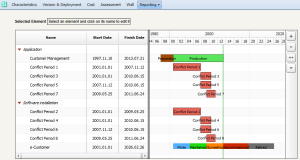
Analyzing Application Life Cycle and Installations
A report enables display in the same Gantt diagram of life cycle steps of the application and its installations.
A second report indicates any conflicts between life cycles of these objects.
To access these reports:
1. Open the properties of the application concerned.
2. Select Reporting then.
• Gantt Chart to view life cycles of three objects
• Detection of conflicts to view any conflicts.
Detection of conflicts report on an application