Viewing Person Group Characteristics
To view person group characteristics:
1. Access the User Management pages.
2. Select:
• the Person Groups sub-folder for direct access, or
• a classification sub-folder (Person groups by business role, Person groups by writing access area, or Person groups by reading access area) then in the edit area click the Business role, the Writing access area or the Reading access area concerned.
The list of person groups appears with for each group, where necessary, its associated LDAP group or associated macro and it comments.

You can sort or filter the display according to columns.
You can connect an LDAP group or connect a macro to the group in this page (with a click in the corresponding field).
3. In the toolbar, click
Properties 
.
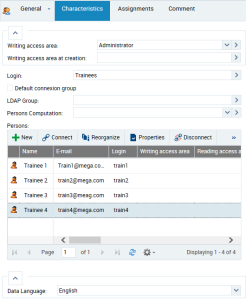
The Properties dialog box of the person group opens.
4. Click:
• Characteristics to define or modify the person group properties.
• General > History to display the actions performed on the person group.
• Assignments to display the business roles assigned to the person group.
The
Assignments tab appears in the case of management of profiles by assignment of business roles to persons, see
"Profile Properties".