Modifying password management configuration
To modify configuration linked to password management:
1. Access environment options.
2. In the options tree, expand the Installation folder and select User Management.
3. In the right pane, you can modify default configuration of options:
• Number of tries before password invalidation.

Default value: 3
• Password expiry
Default value: 40 days
Modifying password definition rules
To modify password definition rules:
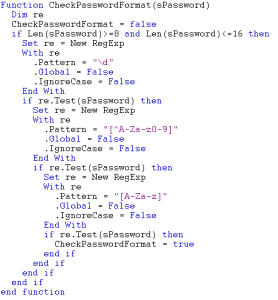
1. Edit the CheckPasswordFormat macro.
2. Overload the macro CheckPasswordFormat with your definitions.
By default this macro imposes that the password should comprise:
• between 8 and 16 characters
• at least one letter
• at least one figure
• at least one special character