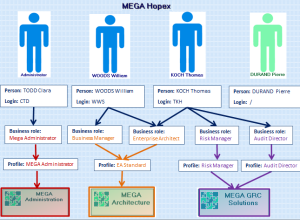
Assignment of business roles to persons mode
The Management of assignment of business roles to persons option is selected (default mode). In this case, you must assign a business role to the person. To connect to MEGA:
• the person must have a login
• the person must have at least one business role
• this business role must be connected to a profile
The profile is connected to the business role that is connected to the person by assignments.
In the above example:
• Clara TODD has a login connected to the MEGA Administrator business role (connected to MEGA Administrator profile):
she can connect only to Administration applications (Windows Front-End and Web-Front-End).
• William WOODS has a login connected to Business User and Enterprise Architect business roles (connected to EA Standard profile):
he can connect only to the MEGA Architecture application.
• Thomas KOCH has a login connected to business roles Enterprise Architect (connected to EA Standard profile), Risk Manager (connected to ERM Risk Manager profile) and Audit Director (connected to Audit Director profile):
he can connect to applications MEGA Architecture and MEGA GRC Solutions.
• Pierre DURAND does not have a login:
he cannot connect to MEGA.
 See "Creating Users".