Defining how to populate the Report DataSet
In the Report DataSet Definition you have to define how to populate the Report DataSet.
Input data can be:
• attributes collected from the source MetaClass
• retrieved through queries related to the source MetaClass
• computed:
• Report DataSet Property
To define how to populate the Report DataSet:
1. From the Utilities Navigation window, in the Report DataSet Definition folder, right-click the Report DataSet Definition and select properties.
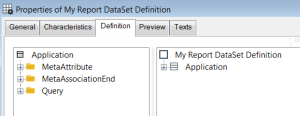
2. Click the Definition tab.
The right pane displays the root of the
Report DataSet Definition tree structure: the Report DataSet Collection

linked to the Report DataSet Structure

.
3. In the right pane, right click the Report DataSet Collection and select Properties.
Example: Application
4. To define how to populate the Report DataSet Collection:
• in the Populating Collection Parameter field, select the Collection parameter.

A Collection parameter is available if in the
Report DataSet Definition Characteristics tab, you added a
Collection Parameter,
see
"Adding Collection parameters".
• else, in the Populating Query drop down list, select or create a query.
If you created a Property parameter in the
Report DataSet Definition Characteristics tab (
see
"Adding Property parameters" ), you can use it in the query.
5. Click OK.