Adding External References in a Descriptor
If you have created external references for certain repository objects, you can include fields corresponding to these references in your descriptors to quote them in generated reports (MS Word).
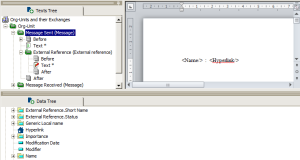
In the “Org-Units and their exchanges” descriptor that you created earlier, add a group enabling creation of a link to external references associated with the messages sent.
To do add an external reference in a descriptor:
1. in the group (example: “Message-Sent”) add a new group.
The Group Properties dialog box opens.
2. Select Repository query or leg and:
• In the Described object field select “External reference”.
• In the Query or leg field select “External reference”.

Else select
Embedded query and enter: Select [External reference] where [Message]= "&Message"
3. Click OK.
An External Reference folder is added in the tree.
4. Add a text to this group.
An empty report (MS Word) appears.
5. Add the “Name” and “Hyperlink” fields (drag and drop).
In the report (MS Word) obtained after processing the descriptor:
• The “Name” field contains the name you gave to the external reference.
• The “Hyperlink” field indicates either the file path or the URL address, depending on the type of external reference.
The content of the external reference cannot be displayed using this method. To do this, you must use a macro. For more details, see
"Using Macros".