Consulting Design Task Properties
To consult design task properties:

Right-click a design task and select
Properties.
The Characteristics tab allows you to view:
• in the Standard subtab: the design task assigned user.
• in the Advanced subtab:
• the assigner
• the project with which the design task is associated
• the design task motive (requirement or request for change)
• the assignment date
• the completion date (date on which task is completed)
• the resolution date (date on which task is validated)
• the design task due date
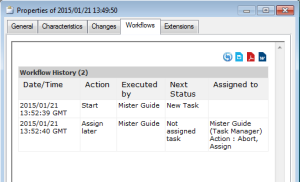
The Workflows tab lets you consult the history of triggered workflow transitions: