Assigning and Aborting a Design Task
Assigning a design task later
When you created the design task, you were able to create it without immediately assigning it.
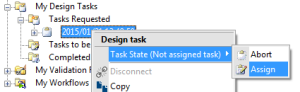
To assign a design task after creation:

In the list of requested tasks, right-click the unassigned task and select
Assign.
Discarding a design task
If a design task has been created but not immediately assigned, it can be aborted.
To abort an unassigned task:
In the list of requested tasks, right-click the unassigned task and select
Abort.