Using Trees
Repository objects are presented as trees to show the hierarchy of objects of the same type.
This tree presentation enables drag-and-drop of a tree object:
• to another tree
• to a list
To access presentation of objects as a tree, for example processes:
1. Select the Environment desktop at the top of the window.

The
Environment desktop is available to Solution functional administrators.
2. In the Organization navigation tab, select All Processes.
The tree root appears in the edit area.
3. Click the

button alongside the root to expand the tree.
To access object characteristics:

Click the object concerned.
The properties appear in the properties pane on the right of the tree.
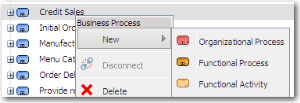
To create an object:
1. In a tree, right-click the object concerned.
2. Select New and select the object type you want to create.
The sub-menu appears grayed if your profile is not authorized to create an object of the selected type.