Describing a project
Project Characteristics
To specify characteristics of a project:
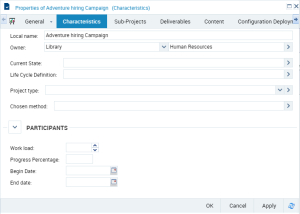
1. Open the project properties dialog box.
2. Select the Characteristics tab.
3. In the Characteristics tab you can modify the Name of the project and define:
• the project type to which the project corresponds.

A project type defines project typology such as description of a business process, mapping or development of applications, etc. A project type can be implemented using one or several methods.
• The Workload necessary for execution of the project and its Progress Percentage.
• Project start and end dates.
Project Content
In the project properties dialog box, from the Content tab, you must declare all objects that will be impacted by the project. These are objects that will be presented to the different project participants as the project progresses.
Identifying project participants
In the project properties dialog box, you can specify information concerning project participants.
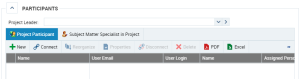
Participants are the project head, modeling participants and business specialists, who will validate modeled objects (such as capabilities or processes).
To specify main participants of a project:
1. Open the project properties dialog box.
2. Select the Characteristics tab and expand the Participants frame.
There are three types of participant:
• The Project Head, who is responsible for the project and executes the following tasks:
• Identifies the different project org-units: project participants, owners, business specialists.
• Assignment of participants in project steps.
• The project head is responsible.
• Project status management.
• Evolution project creation.
• The Project Participant is a generic role enabling assignment of a user to a project.
• The Business Specialist assigned to the project is the main user of the solution. Intervenes on the process architecture at each project phase.
Project Objectives and Indicators
In the project properties dialog box you can also specify objectives and indicators.
Project Objectives and Requirements
Project objectives are specific to a project, for example: "Project duration must not exceed six months" or "Project must implement an Agile method".
An objective is a goal that a company or organization wants to achieve, or is the target set by a process or an operation. An objective allows you to highlight the features in a process or operation that require improvement.
Project requirements are the constraints imposed, for example: "Project must be executed using new version of Visual Studio" or "Project must be executed without intervention of external company".
A requirement is a need or expectation explicitly expressed, imposed as a constraint to be met within the context of a project. This project can be a certification project or an organizational project or an information system project.
The objectives and requirements assigned to a project should be distinguished from objectives and requirements assigned to capabilities, processes and applications handled by the project (which appear in the project Content tab).
To specify objectives and requirements assigned to a project:
1. In the project properties dialog box, select Objectives and Requirements > Objectives and Requirements,.
2. Specify the links Assigned Objective and Imposed Requirement.
Project Indicators
In the project properties dialog box, from the Supervision > Supervision tab, you can specify information concerning project indicators.
An indicator is a measure of achievement of an objective, impact of a risk factor, frequency and impact of a risk, effectiveness of a control, etc.
 For more details on project types and methods, see "Project Creation Wizard".