Shape characteristics
In the left pane of the Display dialog box, select one of the characteristics listed below the object name (for example Name).
The right pane displays two tabs:
• The Content tab enables selection of the fields that are displayed in the shape.
• The Font tab enables modification of characteristics of the font used by the shape.
Display object characteristics
To modify the display of characteristics proposed by default:
1. Right-click the object in question.
2. Select Shapes and Details.
3. In the window that appears, click in the tree on the left, on an object type characteristic.
You can for example choose to display or not display the name of the target DBMS of database object type.
4. Select the corresponding check box and click OK.

The characteristics appear or disappear according to the choices made. These values can be modified in the
Characteristics tab of the Properties dialog box of the object.
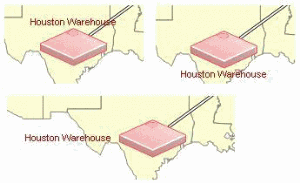
Modifying text field positions (MEGA Windows Front-End).
You can modify the position of object text fields that can be placed in a diagram.
In this way, the position is no longer defined as static in the .mgs file.
To modify the position of a the text field of an object:

Right-click the text field, select
Position and the desired position.
Eg: the text field of a site.
You can thus choose to position the text box on top, on the bottom, to the left, etc.