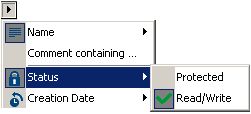
Query Type
You can execute queries as a function of characteristics common to all object types.
Querying object comments
For example, to query a string in the comments of objects.
1. Enter a string in the second box of the query bar.
2. In the drop-down menu, select Comment containing.
3. Click

Querying object names
You can query objects of which the short name:
• begins with,
• ends with,
• or contains a character string.
Query as a function of object status
You can run a query using object status as query criteria: "read/write" (modifiable) or "protected" (read-only).
This criterion can be combined with another. For example, you can query modifiable projects whose names begin with a given string chain. In this case, both criteria are indicated graphically, which allows you to immediately see on which criteria the query is based.
Query by date
You can execute a query by Creation Date or Modification Date. This date can be:
• Before
• On
• After
Query by absolute identifier
When you are in expert metamodel mode (Tools > Options, Repository group, Metamodel Access > Expert), you can execute a query using an absolute identifier.

This command is available only in expert metamodel.