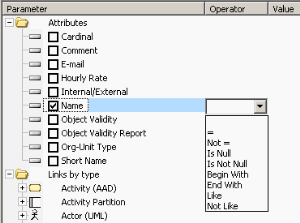
Query Operators

After you have selected the check box corresponding to the query parameter, select an
Operator in the corresponding column.
Operators are defined as a function of the selected parameter.
And, Or, and Not operators
Button

enables use of "And", "Or", and "Not" operators.
These operators concern all parameters selected in the assistant.
Parameters concerned by these operators are highlighted in a color that varies according to the operator (blue for "And", green for "Or", orange for "Not").
And
The And operator means ALL conditions must be fulfilled.
Select [Project] Where [Progress percentage] ="100%"
And [Project manager names] ="Brown"
And [Project diagram] Is Not Null
Or
The Or operator means AT LEAST ONE condition must be fulfilled.
Select [Org-Unit] Where [Message-Sent]
Or [Message-Received]
Or [Message-Collected]
Not
The Not operator means NO condition must be fulfilled.
Select [Org-Unit] Where Not [Message-Sent]
And Not [Message-Received]
And Not [Message-Collected]
Inherited objects
By default, the Inherited Objects option is selected. The code generated by the query assistant includes a keyword citing the inheritance.
Examples of query codes taking account of inheritance
Select [IT Service] Inherited Where [Defining-Application] = 'Myapplication V2.0"
This query obtains all services defined for the "Myapplication V2.0" application , including those inherited.
Select application inherited Where [Functionality] = &func
This query obtains all applications that carry the " My func " functionality either directly or via inheritance.
Deactivating inheritance in the query assistant
To deactivate inheritance in the query assistant:
Click button
and clear
Inherited Objects.

The
Inherited Objects option of the assistant dialog box impacts only the code generated by this assistant.