Defining a Default Library
To define your default library:
1. In the Home navigation window, select the library on which you wish to work.
2. Right click on the library and select Set As Default.
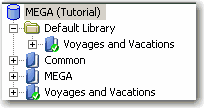
This library appears with a green tick, and is automatically placed in the Default Library folder.
The default library is used to store an object if there is no current library at the time of its creation.

in the
Home navigation window, right-click the
Default Library folder, select
Connect > Library and specify the library you wish to define by default. It appears in the folder.