Scheduling a Down Alignment
Using a Down Alignment approach ensures that lower environments reflect the state of Production.
You can schedule a Down Alignment to synchronize the Development environment with the current state of Production.
 A manual Down Alignment (Production to Development) can be triggered on demand when developers need to mirror Production to debug, reproduce issues, or validate changes.
If needed you can cancel the scheduled down alignment.
To schedule a Down Alignment:
1. Access the HAS console of your Development environment.
2. In the navigation bar, select Self-service > Down Alignment.
3. Click Schedule Down Align.
The calendar opens and shows any time slots already booked for other actions. These slots are unavailable.
Hover over a booked slot for information on the action.4. In the calendar, click the required date.
 If needed, click
 to view up to 12 months ahead and select a date.
5. Use the drop-down menus (Hours:Minutes) to define the time.
(Default time: 09:00).
The time is defined in the platform local time.Time format: hh:mm where hh: 00-23 and mm: 00-55 (in 5-minute intervals).
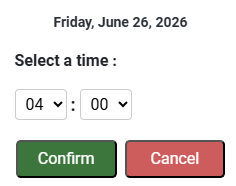
6. Click Confirm.
The selected day and time are booked.
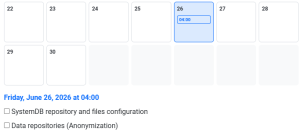
7. Select what you want to synchronize from Production to Development:
• SystemDB repository and files configuration: this refers to the configurations of the modules.
• Data repositories (Anonymization): data from your repositories is anonymized
8. Click Confirm.
The Down Alignment process is scheduled and its characteristics are detailed:
• Status: Scheduled
• Scheduled for: scheduled date and time
• Submitted by: submitter
• detail of synchronization
