Authentication and Mapping Principle
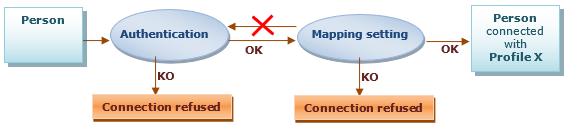
The connection to Hopex includes the following phases:
• Phase 1: Authentication
The authentication phase consists in checking that the person connecting to Hopex exists and that his/her identification is valid. This authentication can be independent of the Hopex repository.
Once validated, this authentication phase is not called later at the mapping phase.
• Phase 2: Mapping
The mapping phase consists in defining the profile with which the authenticated person will connect to the application.
Without a profile assigned the connection is refused to the user, even authenticated.
• Phase 3: Connection and access to the repository
Once authentication and mapping phases are validated, the person can connect to the application and access the repository.
The person selects the repository and the profile with which he/she wants to connect.
Choosing an Authentication Mode
In Hopex (Web Front-End) authentication is managed by Hopex Unified Authentication Service (UAS). UAS enables to define how the user authenticates.
 For a detailed description, see Installation and Deployment > Hopex Unified Authentication Service> UAS Configuration documentation.
To select your authentication mode, Bizzdesign recommends that you use authentication systems that comply with Standards (e.g.: SSO). You can choose an authentication managed:
• by an external module
If your enterprise has an external authentication or SSO module, it is preferable to use the delegated authentication system.
Example: SAML2, OpenId.
To define and configure your external authentication mode, see Installation and Deployment > Hopex Unified Authentication Service documentation.
• within the Hopex platform (by default)
If you have no standard authentication system in your enterprise, you can use the authentication system managed within Hopex.
Modifying the Hopex Authentication Mode for a User
User authentication mode is defined on the login by the Authentication Mode parameter.
Hopex (Web Front-End) provides the MEGA authentication mode (by default): the Hopex authentication service checks that the password entered matches the password stored in Hopex repository.
To modify the authentication mode of a user, see Authentication mode (case of authentication managed within Hopex).