1. Connect to Hopex Administration and select the repository concerned.
2. Right-click the repository concerned and select Logical Backup.
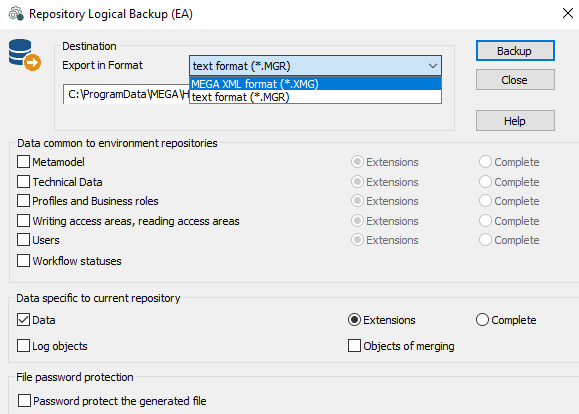
The Repository Logical Backup dialog box opens.
3. In the Destination pane, select the export format of the backup file:
• text format (*.MGR).
• MEGA XML format (*.XMG)
This format is reserved for exchange of data between Hopex and other applications. It includes commands or data (objects and links).
This format cannot be used to extract the metamodel or technical data.

For more details on MEGA XML data exchange format, see technical article
MEGA Data Exchange XML Format EN.

Environment options enabling configuration of
Hopex data export (XMG encoding, default export format, etc.). See
Options.
4. (Optional) In the
Destination pane, click
Browse 
to browse the folder tree and modify the name and/or location of the backup file.
By default, the backup creates a file "RepositoryName.mgr" in the WORK
work folder.
We recommend that this backup be made to a physical device other than the device on which the repository is located. Selection of a different logical device, such as a different partition on the same disk, does not protect your backup in the event of disk failure.
5. Select the type of data you want to save.
The
Extensions buttons correspond to data created by users.

Carry out a complete backup only if technical support asks you to do so.
You can choose what you want to save: extensions common to environment repositories and data specific to current repository. It is recommended that you save all these elements in separate specific files, with names indicating their contents.
For a standard logical backup, simply select the
Data and its
Extensions.
In the Data common to environment repositories pane, select the data type of the system repository to be saved:
• Metamodel allows extraction of the
metamodel, if the standard metamodel has been modified.
A complete logical backup of the repository including the
Technical Data can take time and occupies considerable space.
• Profiles and Business roles allows extraction of created profiles and business roles (those not provided by Bizzdesign).
• Writing access areas and reading access areas allows extraction of created writing and reading access areas (those not provided by Bizzdesign).
• Users allows extraction of created users (persons, person groups, logins).
• Workflow statuses enables extraction of workflows (workflow instances, transitions and statuses, tasks, validations, requests for change).
In the Data specific to current repository pane:
• Data allows extraction of repository data. This data includes assignment of business roles to persons.
• Log objects allows you to include object histories in the extraction of Hopex data.
• Objects of merging allows you to export technical objects resulting from merging objects (_TransferredObject).
6. (If needed) In the File password protection pane, select Password protect the generated file.
The password is asked at file import.
7. Click Backup to start backup.
During execution of backup, a series of messages keeps you informed of progress.
The backup report is displayed in the Report area.
To update a repository, import the repository backup file.
To delete an SQL Server repository, you need the appropriate administration rights: at least db_creator.