Opening the reading access diagram (Windows Front-End)
To access the reading access diagram:
1. From Hopex Administration, connect to the environment.
2. Expand the User management folder of the environment.
3. Right-click the Data Reading Access folder and select Open Diagram.
The reading access diagram appears.
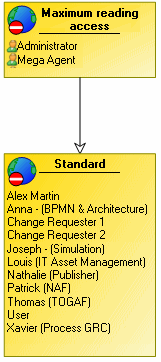
By default, the reading access diagram contains two reading access areas:
• Maximum Reading Access is the highest reading access area level.
Users connected to this area can see all objects in the repository.
Users connected to this area can see all objects in the repository.
• Standard is the lowest reading access area level.
 There can only be one maximum level and one minimum level (standard) reading access area in the diagram.