Associating Users with User Reading Access Areas
In the case of the reading access area matrix, to associate a user (or user group) with a reading access area:
1. From Hopex Administration, connect to the environment.
2. Expand the User management folder of the environment.
3. Right-click the user Data Reading Access folder and select Reading Access Matrix.
The reading access area matrix appears.
4. Right-click the user reading access area concerned and select Properties.
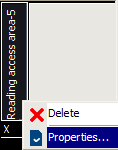
The user reading access area properties window appears.
5. In the Persons tab, click Connect.
 If you want to create a new Person (or new person group) and associate it with the reading access area, click New.
6. In the query tool, click the arrow in the first field and select Person (or Person Group).
If you want to select persons and person groups, select Access Area Member.7. (optional) In the second field, enter the character string to be queried.
8. Click Find  .
.
.9. In the query result list, select the person (or person group) required and click Connect.
Press the [CTRL] key to select several persons and/or person groups simultaneously.The user (or user group) you have connected appears in the list of users in the selected reading access area.