Associating User Reading Access Areas with Object Reading Access Areas
To associate a user reading access area with an object reading access area
1. Open the reading access area matrix.
2. In the reading access area matrix, right-click the cell at the intersection of the user reading access area and the object reading access area and select Connect.
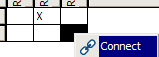
A cross represents the association between the two selected reading access areas. The corresponding links are automatically drawn in the reading access diagram.
 If you begin management of reading access of your data from the reading access area matrix, you must continue management of reading access from this matrix. Do not manually modify links created automatically in the reading access diagram; you may invalidate the diagram.
 For more details on the reading access diagram, see Reading Access Diagram.