How to Add Several Objects to the Root Collection
If your TreeSet Definition is based on a Collection Parameter, at TreeSet Definition creation, the root Collection parameter is made up by a collection of objects with a Multiplicity value set to "1" by default. This means that at TreeSet creation the user can add a single object only.
 Be careful in adding too many objects as TreeSet entry points, as the TreeSet might be two crowded
If you still want the user to be able to add several objects as entry points at TreeSet creation:
• set the root Collection parameter multiplicity to "N"
• else create a TreeSet Definition based on a Query Parameter, with a query collecting several objects.
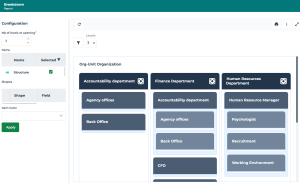
Note that, when the TreeSet has several objects as entry points, the Root node  is displayed.
Example: Adding selected objects as root Collection parameter
To add several objects to your root node:
1. Access the Collection Parameter - based TreeSet Definition properties.

2. Display its Characteristics page.
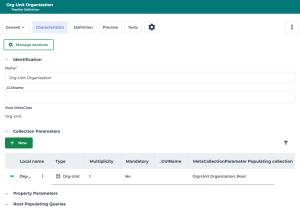
3. In the Collection Parameters section, in the root Collection parameter row:
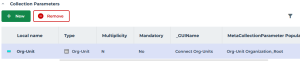
• click the Multiplicity cell and select "N" value.
• (Optional) In the _GUIName cell enter a more suitable name.
Example: "Connect Org-Units".
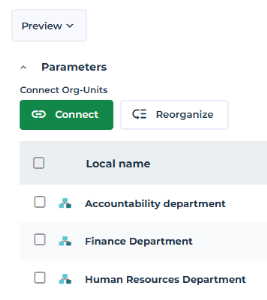
4. Display the TreeSet Definition Preview page.
In the Parameters section the user is now able to connect several objects as entry points of the TreeSet.
Example: add "Accountability departement", "Finance Department" and "Human Resources Department" Org-Units.
5. In the Parameters section title, click  to collapse the section and get more space for the report.
6. Click Apply Parameters.
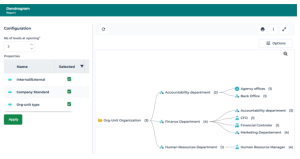
The TreeSet is displayed with the 3 Org-Units connected to the "Org-Unit Organization" root folder.
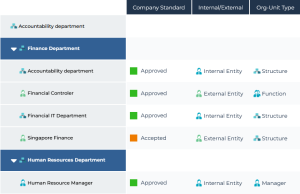
7. Generate Instant Reports:
E.g.: Dendrogram, with its root node displayed.
E.g.: Breakdown