How to Make a Report Creation Available to an Object List
From an object list you can create Instant Reports.
You can customize the list of Instant Reports available by adding specific reports, which are available on this object list.
Example: together with the Instant Reports available for a list of Business Capabilities, Business Processes, or Organizational Processes, you can add the "Execution and Performance HeatMaps" report.
To make a report creation available at Instant Report creation from an object list:
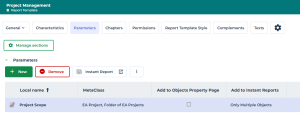
1. Access the Report Template (based on a macro) corresponding to the report you want to provide at Instant Report creation.

Example: "Project Management" Report Template.
2. In its Parameters page, Parameters section, in the required Report Parameter row double-clic its Add to Instant Reports field and select "Always" or "Only Multiple Objects" according to your needs.
Example: "Project Scope" Report Parameter, which is connected to the EA Project and Folder of EA Projects MetaClasses.
The selection of the report creation corresponding to the Report Template concerned is available at Instant Report creation from the object list.
You can add as many reports as available on the object list.
Example: when you click Instant Report from a an object in a list of EA projects the "Project Management" report is also available.
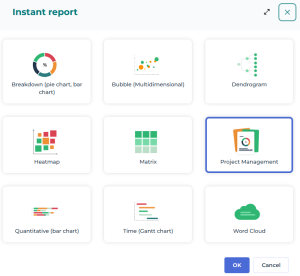
You can customize the report icon: modify the report icon image and name.