How to Group Arcs in a Graph
You can group arcs (or path) of the same type or arcs carrying the same field value or the same object value.
The Grouping on values are:
• (by default) "All arcs"
Groups together all of the arcs matching the GraphSet Arc Definition between two node instances.
• "By field"
Groups together all of the arcs carrying the same field value. The grouping field must be displayed either on the graph or in a tooltip.
 If the field is a multivalued attribute, its picture is shown in the tooltip.Restricted to one object type.
• (path-based arc only) "By object"
Groups together all of the arcs carrying the same objects.
To group arcs of the same type:
1. Access the Report Graph Arc  properties.
properties.Access the Report Graph View  and expand its Report Graph Layer
  concerned, see Accessing the Report Templates and their Constituents.
2. In its Characteristics page.
3. In the Grouping specifications section, in the Grouping on field, use the drop-down list to select the grouping criteria.
4. If you selected a grouping:
• By field: in the Object or Field field, use the drop-down list to select one of the available fields of the nodes.
• By object: in the Object or Field field, use the drop-down list to select the object.
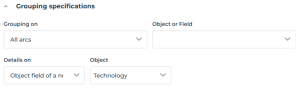 You can set a display on details of your arc grouping
Setting a display on details of an arc grouping
