Managing Languages
You can specify the language in which you want to send workflow notifications and messages.
Notification languages
All languages specified in the body of the notification are taken into account.
E-mail language
When a workflow transition triggers an email notification, the email is generated in a language specified in the options at the environment level.
To configure the workflow e-mail language:
1. Log in as "Hopex Administrator" and select Environment options.
2. Go to Tools > Collaboration > Workflows.
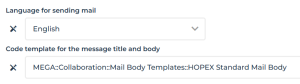
3. Select a language in Language for sending mail.
4. Below, customize the Code template for the message title and body.
It allows to define an html template for the workflow emails.
 The default code template is "HOPEX Standard Mail Body", which is located in the "MEGA::Collaboration::Mail Body Templates" code template folder.
If you want to use a different code template, copy and paste its full path into this field, as illustrated below. If needed, use Hopex Windows Front-End.
The code template must contain {{MAILBODY}}, which specifies the location within the template where the message defined by the workflow action is inserted.
You can also include {{MAILTITLE}} to display a generic title. The code template's GuiName is used to populate it.