Adding a MetaAssociation
To add a MetaAssociation between two MetaClasses in the diagram:
1. In the metamodel diagram insert toolbar, click MetaAssociation  , then draw a link from the first MetaClass to the second.
, then draw a link from the first MetaClass to the second.2. In the Add MetaAssociation dialog box, click the arrow to select the MetaAssociation that interests you.
 The vertical arrow only appears if the MetaAssociation has already been created. To create a MetaAssociation, click the horizontal arrow and select New.
3. Click Connect.
The selected MetaAssociation appears in the diagram.
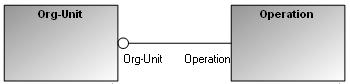
You can access the attributes of the MetaClass by opening its Properties window.
The major MetaAssociationEnd is indicated by a black diamond (composition), white diamond (aggregation) or a slash (default). See Creating a MetaAssociation and Specifying MetaAssociation Behavior for more details.