Business Capabilities Reports
Reports enable you to analyze the business capabilities of your repository according to different perspectives.
 For detailed information on reports, see Generating Reports.
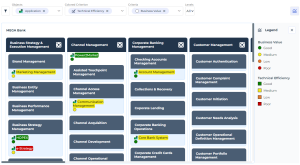
Business Capability Breakdown Report
You can use a breakdown report to visualize:
• the objects that make up a business capability map
• the realization of capabilities by EA equipment
For more details on use of a breakdown report, see Handling a Breakdown Report.Example
Access
Business Capability Coverage over Time
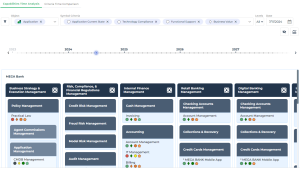
This breakdown report provides a temporal representation of the elements that make up a business capability map and the applications or application systems that cover them.
Applications are analyzed according to various possible criteria. A timeline shows their evolution over several years.
Two views are available:
• Capabilities Time analysis: a treemap displays the various business capabilities and the applications that cover them.
• Criteria Time Analysis: a table displays the values of the selected indicators according to the dates indicated.
Example
Access
Parameters
Business Capabilities Tree Map
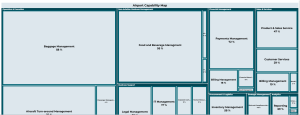
This report breaks down a capability tree in the form of a treemap according to one of three possible criteria:
• Number of components: the surface area is proportional to the number of sub-capabilities in the tree.
• Application ratio: the surface area is proportional to the realization percentage of the current capability by applications.
• Cost of applications: the surface area is proportional to the cost of applications realizing current and descendant capabilities in the tree.
For more information about the use of a Treemap, see Handling a Treemap.Take note that:
• Since an application can realize several capabilities, the "Cost Contribution Key" ratio is applied to the criteria "Application ratio" and "Cost of Applications".
• An application realizing an "intermediate" capability (i.e. not a leaf of the tree) is considered to realize all its sub-capabilities in a uniform way (strict pro rata between all sub-capabilities).
Example
Access