Forcing Object History Retention During Import
An option at the environment level allows Hopex administrators to force object history retention for Excel import.
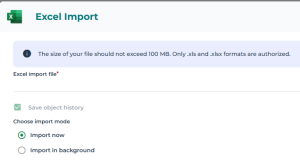
When this option is enabled, history tracking becomes mandatory and can no longer be disabled by end users during the import process, ensuring that all imported changes are recorded and remain traceable.
 Enabling this option may have an impact on import performance.
To force object history retention during import:
1. Login with the "Hopex Administrator" profile.
2. Select Environment Options.
3. Expand Tools > Data Exchange> Exchanges with third party tools > Excel.
4. Select Force save object history during import.
5. Click OK.
When a user imports an Excel file, the Save object history check box is grayed and cannot be cleared.
See also: Using the Excel import wizard.