Setting Up the Connection
Confluence Administrator must set up the Hopex for Confluence module.
To set up the connection between Hopex and Confluence:
1. Click the Cogwheel  button and select Confluence administration.
button and select Confluence administration.
The Confluence administration page opens.
2. In the navigation menu, select Settings > APPS > Hopex for Confluence.
A specific page opens.
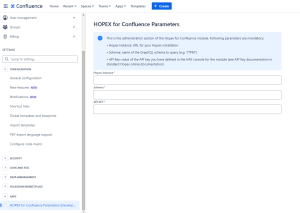
3. Enter your Hopex Instance.
4. Enter the name of the GraphQL schema to query (e.g. "ITPM").
5. Enter your API Key

6. Click Save Parameters.