Assigning Org-Unit Responsibilities
Assigning Org-Unit responsibilities for a given operation
To assign Org-Unit responsibilities for a given operation:
1. From a process diagram, select the appropriate operation and click the  button.
button.2. Access the Properties tab > Org-Unit Responsibilities section.
 You can display (or hide) sections using the Show/Hide
  button.
 3. Connect an existing org-unit or create a new one.
The org-unit appears in a table.
4. In the RACI column, select the adequate responsibility level:
• Accountable
• Consulted
• Informed
• Responsible
• Responsible/Accountable
RACI is displayed along with a warning since RACI Synchronization does not apply to manually added data.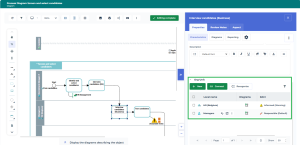
Assigning Org-Unit responsibilities for a given process
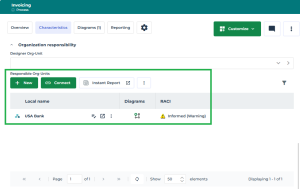
To assign Org-Unit responsibilities for a given process:
1. Open the Characteristics property page of the process and expand the Org-Unit Responsibilities section.
 In the diagram, select the process, then click the Open the aspect page
  .
.2. Connect an existing responsible org-unit or create a new one.
The org-unit appears in the table.
3. In the RACI column, select the adequate responsibility level:
• Accountable
• Consulted
• Informed
• Responsible
• Responsible/Accountable
RACI is displayed along with a warning since RACI Synchronization does not apply to manually added data.