Using an operation or sub-process
In a process diagram, a process can be represented either by:
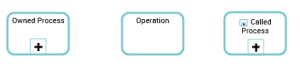
• an operation (atomic task)
The operation can only be owned by the described process.
 An operation is an elementary step in process executed by an org-unit. It cannot be broken down. An operation can be industrial (manufacturing a component), logistical (receiving a delivery), or can involve information processing (entering an order).
• a process (sub-process)
The process can only be owned by the described process, of which it becomes a sub-process.
A process is a set of operations performed by org-units within a company or organization, to produce a result. It is depicted as a sequence of operations, controlled by events and conditions. In the BPMN notation, the process represents a sub-process from the organizational point of view.For data consistency, you cannot use the toolbar to add an existing sub-process to the described process.
To support bottom-up modeling, you can add an existing process to the diagram by drag and drop from the process inventory (tree of the browse area) or the search results.
 In that case, no consistency checks are performed. Make sure the process is not already used within another process, otherwise data may become inconsistent.
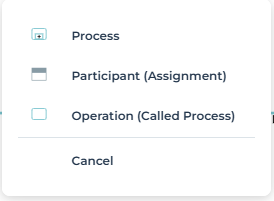
When you drag and drop a process, you are prompted to choose whether it should be used as a sub-process, within an external participant, or as an operation calling a process. (see Creating an operation that calls a process).
• a called process (a process called by an operation)
The called process may be owned by a library or by a process other than the one described. A process can thus be called in different contexts.
Creating an operation that calls a process
You can create an operation that calls a process. This functionality enables, for example, replacement of the process called by another process without disturbing description of the main process.
 The called process may be owned by a library or by a process other than the one that called it.
To create an operation that calls a process:
1. In the object inserting bar, click the drop down menu of Operation  and select Process.
and select Process.2. Move the object to the appropriate area within the diagram.
The add dialog box appears.
3. Select the called process.
In our example, "Process Purchase Request" could be replaced by "Process Urgent Purchase Request".
You can select several processes. One operation is created per process.4. Click the Create button.
The operation appears in the diagram with the name of the process.
By default, the operation carries the same name as the called Process.Calling a Process from an Operation
From an operation, you can call an existing process or create a new one.
To call an existing process from a operation:
1. Click the drop down menu of the operation and select Connect Called Process.
The search dialog box opens.
2. Select the process that interests you.
3. Click the Connect button.
To create a process from an operation:
 Click the drop down menu of the operation and select New Called Process.
The new process appears in the operation icone.
If a current library is defined, its name appears in the Owner field of the new process Characteristics page. For more details on the current library, see Setting a Current Library.Transforming an operation into a sub-process
To transform an operation into a sub-process:
Click the drop down menu of the operation and select Transform to sub-process.The operation is replaced by a process having the same name.
The created process is owned by the described process.Transforming a sub-process into an operation
It is possible to transform a process into an operation. Two possibilities are proposed:
• the process is replaced by a new operation whose name is that of the process,
• the process becomes a process called by a new operation
The called process has no more owner.To transform a process into an operation
Click the drop down menu of the process and select Transform to elementary task.An operation with the process name appears in the diagram.
To transform a process in a called process:
Click the drop down menu of the process and select Transform to called process.An operation with the process name appears in the diagram.
The called process has no more owner.