Connecting an External Process to an Event
In a process diagram, you can display:
• The upstream process connected to the start event
• The downstream process connected to the end event
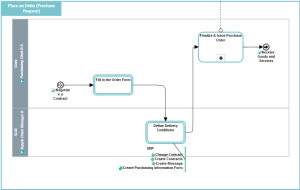
In this process diagram example, the start event shows the upstream process "Negotiate a Contract" and the end event shows the downstream process "Receive Goods and Services".
Prerequisites
To display the external processes that are connected to events, you must activate an option:
1. Click the Views and Details button  .
.
. 2. Select View External Processes.
3. Click Apply.
Connecting a Process to an Event
To connect an upstream process to a start event:
1. Select the start event in the process diagram.
2. Click the Open the aspect page button  to display the event properties, then click the Properties tab.
to display the event properties, then click the Properties tab.3. In the Upstream Processes section, click Connect Previous Process.
4. Select the relevant process in the tree-list.
 When an uptream process is connected to a start event, a sequence flow is automatically created between these objects. If several sequence flows are already connected to the start event, the user must select the adequate sequence flow.
To connect a downstream process to an end event:
1. Select the end event in the process diagram.
2. Click the Open the aspect page button  to display the event properties, then click the Properties tab.
to display the event properties, then click the Properties tab.3. In the Downstream Processes section, click Connect Next Process.
4. Select the relevant process in the tree-list.
When a downstream process is connected to an end event, a sequence flow is automatically created between these objects. If several sequence flows are already connected to the start event, the user must select the adequate sequence flow.