Creating a Delegated Administrator
The initial Delegated Administrator must be assigned by the Cloud Services team (MCS). Once this role has been assigned, you can create additional Delegated Administrators as needed.
To create an additional Delegated Administrator:
1. Access the HAS Console as a Delegated Administrator.

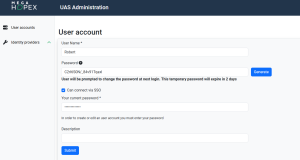
2. In the navigation menus, select Modules > Authentication > User accounts.
3. Click Create.
4. Enter the new delegated administrator details:
• Login (mandatory): enter the login of the user
• First Name (optional): enter the first name of the user
• Last Name (optional): enter the last name of the user
• Email (optional): enter the email of the user
• Password: enter a temporary password or click Generate.
 The password expires in two days and must be shared with the user for first-time login.
 • (Optional) Select Can connect via SSO to allow login via Single Sign-On.
• (Optional) Add a Description.
5. Click Submit to confirm.