Filtering Incident-Related Amounts
To filter amounts corresponding to losses, gains, provisions or recoveries:
1. Launch the Advanced search via Main menu > Advanced Search.
2. Select the Object type of interest (losses, gains, provisions or recoveries) and click Search.
3. Make sure that the Amount (local) column is displayed.
 Filtering works only from the Amount (local) column.
4. Click the Display filters  icon.
icon.
icon.5. In the Amount (local) column, select an operator, for example "Lesser".
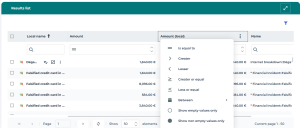
6. Enter the desired amount.
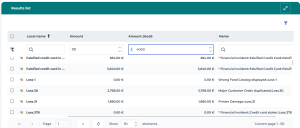
The result list displays the amounts corresponding to your filter.
You may, for example, display the losses whose (local) amount is less than 4000 euros.