Control Identification (Dashboard)
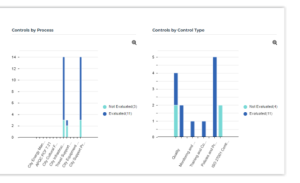
This report presents distribution of controls according to several perspectives:
• entities
• process categories/processes
• control types
• accounts
Path
Navigation bar > Reports
Parameters
|
Parameters
|
Remarks
|
|---|---|
|
Begin Date
|
Optional
All controls created after this date are selected
|
|
End date
|
Mandatory
Initialized with current date
All controls created before this date are selected
|
|
Context objects
|
Optional
The context object can be an:
- Entity
- Control type
- Process category/process
- Account
|
Connecting context objects
You can specify context objects enabling display of controls linked to:
• Entities
• Process categories/Processes
• Types of control
• Accounts
To connect context objects:
 In the appropriate frame, click Connect ....
In the dialog box that appears, you can select objects in two ways:
• via a tree: select the objects to be connected in the proposed tree and click OK.
• via the query tool: select the required object type in the drop-down list, click the Find button, select the objects to be connected and click OK.
Results
To obtain the list of controls making up a bar chart bar:
Click the bar chart bar that interests you.The list of controls taken into account is presented at the bottom of the edit area.
Bars of the bar chart distinguish assessed controls from those not yet assessed.
Example