Performing a BIA
Once the GRC Manager has created a Business Impact Analysis and sent the BIA matrix to the process owner, the latter can fill in the matrix. He/she qualifies the impact of a disruption on the process of interest.
 The GRC contributor can also perform a BIA (Business Impact Analysis).
To perform a BIA:
2. In the BIA properties, select the Analysis page.
3. Select the Impact Type:
• Finance
• Operations
• Regulatory
• Reputation
• Environment
4. In the matrix, indicate a value to describe the impact, for each downtime period:
If a BIA has already been performed for the process, previous results are displayed.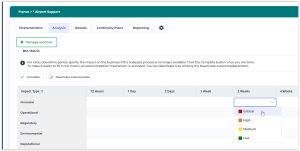
An Autocomplete feature is available. It enables to fill in automatically the cells on the right of the cell you are filling in.
If you prefer not to use the AutoComplete feature, click Deactivate AutoComplete.You obtain a matrix of this type:
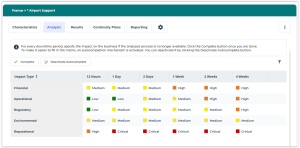
5. After having filled all rows and columns, click the Complete button.
The values in the matrix enable to compute business continuity indicators:
• the RTO (Recovery Time Objective)
 The Recovery Time Objective (RTO) determines the maximum tolerable amount of time it takes to bring critical systems back online, possibly in a Degraded Mode. It is related to downtime, representing target time following an incident for Product or service delivery resumption, or Activity resumption, or Resources recovery.
• the business impact
A business impact is the outcome of a disruption.These results appear in the BIA Results page. See Viewing a BIA Computed Results.