Preparatory Work
Core Concepts
In the module interface, you can configure mappings by setting up:
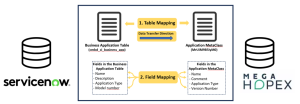
• the objects to synchronize between Hopex and ServiceNow (e.g. Applications) through a Mapping of tables.
The following information must be defined:
• the Hopex MetaClass and the ServiceNow table in which the objects are stored
 If needed, you can explore ServiceNow's data model from Hopex.
• the direction of data transfer (bidirectional is possible)
• the synchronization mode (preserving or deleting objects from the target system)
• the fields to synchronize along with the objects (e.g. name, description and version number of the Applications) through field-level mappings.
Exploring ServiceNow's data model from Hopex
You can explore ServiceNow tables and fields from Hopex.
To do so:
1. In the menu, click Explore SNow.
2. Select a ServiceNow table.
3. Click Explore selected table.
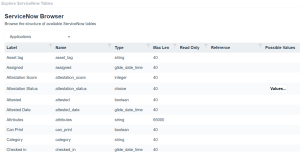
A table appears and shows all the fields and their characteristics (type, maximum length, possible values, etc.) for a given object type in ServiceNow.
 You can filter the results via the column headers
  .
.