Mapping Tables
To map a ServiceNow table with a Hopex MetaClass:
1. From the Mapping menu, click Add Mapping.
The Map a table creation page appears.
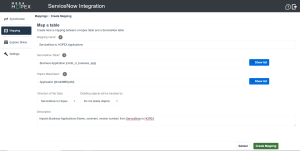
2. Enter a Mapping name.
3. Select a ServiceNow table and a Hopex MetaClass.
 The most commonly used Hopex MetaClasses for mapping are listed:
• Application, Application system, IT service, Micro-Service,
• Vendor, Software technology
• Business Capability, Business Line, Org-Unit, Process Category, Message Flow
• Computer Device, Server (Deployed), IT Infrastructure, Software Installation, IT Server
• Database, Data Domain
• Person (System)
If you need to map a Hopex MetaClass that is not proposed by default:
• Go to Main Menu > Settings > Options > Tools > Data Exchange > Exchanges with Third Party Tools > ServiceNow Integration > Scope of Candidate MetaClasses in Hopex.
• Select All MetaClasses.
4. Select the Direction of the data.
5. Specify whether objects should be preserved or automatically deleted from the target system.
• Do not delete objects is safer but is more likely to lead to duplicates if not used carefully.
• Deleting objects by Hopex or ServiceNow is more likely to lead to data loss, but it ensures greater consistency with the source objects.
See below examples about deleting or preserving objects. 6. Enter a Description.
7. Click Create Mapping.
The mapping now appears in the list of mappings.
Below are examples about deleting or preserving objects from the target system.
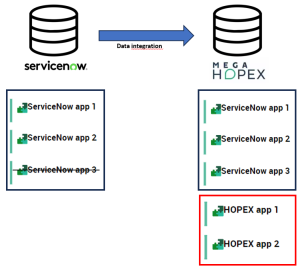
Example 1
Scenario: Configuring the sync of applications from ServiceNow to Hopex with no deletion.
Results:
• Any application created or updated in ServiceNow is mirrored in Hopex.
• Any application deleted in ServiceNow is not deleted in Hopex.
• Any application created directly in Hopex is not deleted.
Example 2
Scenario: Configuring the sync of applications from ServiceNow to Hopex with deletion handled by ServiceNow.
Results:
• Any application created, updated or deleted in ServiceNow is mirrored in Hopex.
 Any application created in Hopex is deleted at the next sync.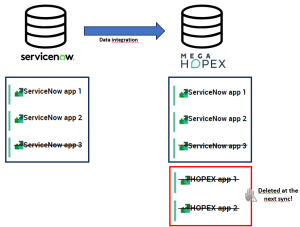
Example 3
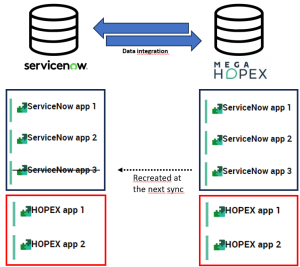
Scenario: configuring bidirectional sync of applications with no deletion.
Results:
• Any application created or updated in ServiceNow is mirrored in Hopex and vice versa.
• Any application deleted in ServiceNow is not deleted in Hopex and vice versa – but it is recreated at the next sync (as data integration is bidirectional).
If you need to delete an application, you therefore have to do it in both solutions.