Categorization Schemas
Hopex enables to classify objects through categorization schemas.
Categorization example: Asset review periodicity
Creating a categorization schema
To create a categorization schema:
1. In the Administration navigation menu, click Categorization > Categorization Schemas.
2. Click New > Categorization Schema.
3. Enter a Name.
Example: Asset review periodicity
4. Click OK.
5. At the categorization schema level, click Category of Architecture Block.
6. Select the “Assets Category” Object type.
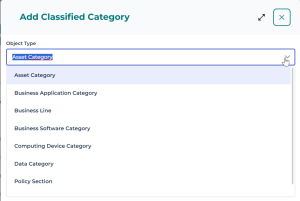
 The Asset category object type is generic enough to be used on different object types. There are more specific object types, such as software technology category, business application category.
7. Click Next.
8. Enter a Name and create as many category values as needed.
Examples: Review twice a year, Review every two years, Review each year
Give a meaningful name to specify the context of the category. It will enable to connect it to another object more easily.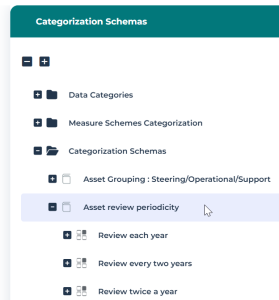
Connecting an object to a category
The categories you have created can be used to classify an object.
To classify an object:
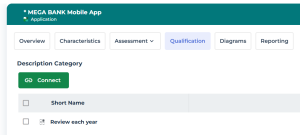
1. In the object properties, select the Qualification page.
The Qualification page is not necessarily displayed by default. You can add it via the Display/Hide button.2. Click the Connect button and select “Asset category” in the drop-down list (or another appropriate value).
3. Look for the category value of interest and click Connect.