Describing a Business Capability
Creating a business capability from a business capability map diagram
You can create a business capability from a business capability map diagram:
1. In the Business navigation menu, click Capabilities.
2. Move the mouse over the relevant business capability map and click the New > Business Capability button.
3. Name the business capability and click OK.
The new business capability appears under the map.
Defining the properties of a business capability
To display properties of a business capability:
 In the navigation tree, select the business capability of interest.
The Characteristics property page of the business capability map provides access to:
• its Owner. By default, when a business capability is created, it is the current enterprise.
• the text of its Description
• its Sub-capabilities
• its Supporting Assets
Other pages can be used to complete the description of a business capability. The Dependencies page lists dependent business capabilities and required business capabilities.
 Note that some of the pages can be hidden by default.
Defining business skills and functionalities associated with capabilities
Each business capability is associated with business skills and functionalities.
To associate a skill with a business capability:
1. Open the Expected Capabilities properties window of the business capability.
This page is not necessarily displayed by default.2. In the Expected Business Skill section, click New.
3. In the add dialog box, select or search for a business skill and click Create.
The business skill appears in the list of skills associated with the business capability.
For more information on enterprise skills, see Describing Business Functions. To associate a functionality with a business capability:
1. Open the property pages of the business capability concerned and select the Expected Capabilities page.
2. In the Expected Functionality section, click New.
3. Select a functionality and click Add.
The functionality appears in the list of functionalities associated with the business capability.
For more information on enterprise functionalities, see Describing functionalities. In diagrams, business skills and functionalities appear at the bottom of the frame of the capability described.

A report is available to check the suitability between the business capability map and the operational environment.
Defining the contribution of an application to a business capability
To define the contribution of an application to a business capability:
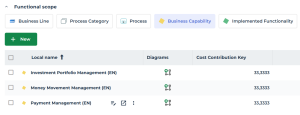
1. In the properties of an application, expand the Functional Scope section and select the Business Capabilities tab.
2. Specify the contribution percentage of the application to the business capability by filling the Cost Contribution Key field.
 The Cost Contribution Key represents the contribution percentage of an application to a business capability.
It determines how the application's operating costs are allocated across the business capabilities it supports.